HTML Rendering
Starting from PPJ 2012 we have added a new property AllowHtml to enable simple HTML rendering for: SalBackgroundText, SalRadioButton and SalCheckBox controls.
When AllowHtml is set to true, the PPJ Framework draws the text in the control as if it was simple HTML. It supports these tags: <b>, <i>, <u> and <br/>.
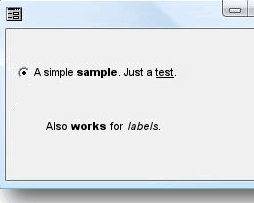
Using this property makes it very easy to add simple formatting to labels without having to resort to custom drawing or to overlayed controls.
Scope
This property describes a limited text renderer, not an embedded browser. Use only the supported formatting tags and keep user-provided markup out of trusted labels. Verify wrapping, measured height, and keyboard labels after enabling it. Browser-based HTML handling on PPJ Web is a separate target capability.