Spell Checker
Screenshots and diagrams on this page illustrate the historical desktop tools or conversion workflow; installed versions may look different.
Starting from version 2011 of the PPJ Framework, we have integrated and added spell checking capabilities to all editable controls:
- SalDataField
- SalMultilineField
- SalComboBox
- SalTableColumn
- VisRichEdit
With spell checking enabled, the PPJ Framework checks words, as they are typed, using standard dictionary files, and immediately underlines spelling errors.

Hunspell
Spell Checking functionality in the PPJ Framework is entirely based on the open source spell checker Hunspell for 32bit and 64bit Windows
Hunspell supplies dictionary-based spelling and morphology. This chapter describes PPJ's Windows desktop integration; browser spell checking is a separate mechanism.
You can find more information here: Hunspell project
Enable the Spell Checker
All editable controls (including VisRichEdit) have the property EnableSpellChecker. Setting this property to true automatically enables spell checking for the control. The spell checking engine uses the default language for the local Windows installation, or the language indicated for the specific control using the CultureInfo property.
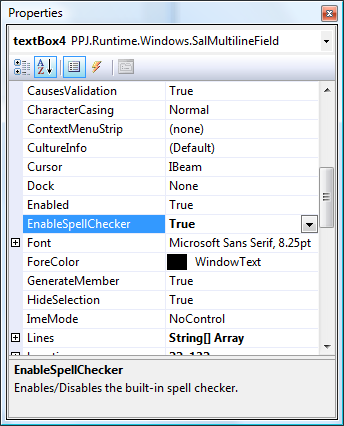
Enable the Spell Checker on other controls
The Spell Checker functionality included in the PPJ Framework can be added to other controls, including all WinForms editable controls derived from TextBoxBase, ComboBox and RichTextBox.
To enable spell checking on a control, simply add this line:
new SpellChecker(this.textBox1);
This is all that´s needed. To indicate a dictionary different from the default Windows language, use this:
new SpellChecker(this.textBox1, "de-DE");
// or
new SpellChecker(this.textBox1, CultureInfo.GetCultureInfo("de-DE"));
Change the Line Style
You can change the line style used to underline spelling errors by setting the SpellChecker.LineStyle property in code:
SpellChecker.LineStyle = SpellCheckerLineStyle.Solid;
Supported values are: ZigZagged (default), Dotted and Solid.
Deployment and Behavior
Deploy the required native Hunspell library for the process architecture and the selected dictionary pair. Test accented words, user vocabulary, and missing dictionaries. Spell checking suggests corrections; it does not validate business codes, identifiers, or required input. See Dictionaries.